
123 lines
5.0 KiB
Markdown
123 lines
5.0 KiB
Markdown
---
|
||
id: "a42566e46c7cc90a"
|
||
title: "AHD摄像头 — LPA3588 v1.3.3 documentation"
|
||
url: "http://wiki.neardi.com/wiki/LPA3588/zh_CN/docs/module/ahd_camera.html"
|
||
favicon: "http://wiki.neardi.com/favicon.ico"
|
||
tags: []
|
||
createdAt: "2026-03-27T03:34:01.857Z"
|
||
updatedAt: "2026-03-27T03:36:17.135Z"
|
||
contentType: "markdown"
|
||
version: 1
|
||
deleted: true
|
||
publishedTime: "2026-03-27T03:34:01.842Z"
|
||
---
|
||
|
||
# AHD摄像头[](#ahd "Permalink to this heading")
|
||
|
||
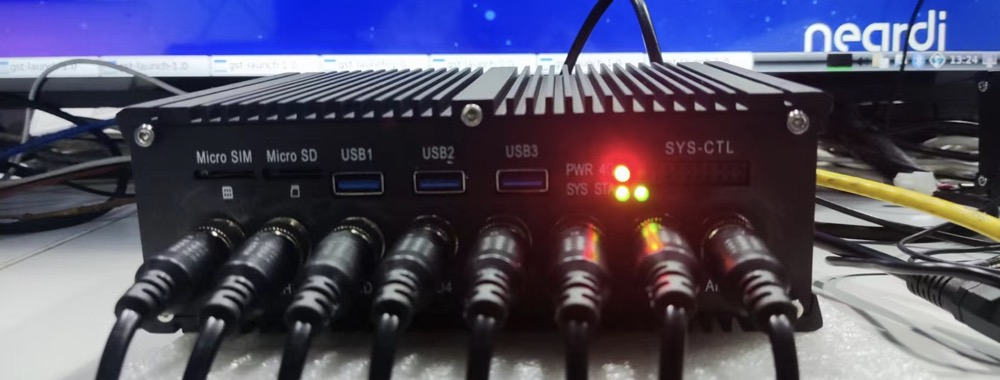
支持8路航插接口AHD摄像头输入[点击购买](https://item.taobao.com/item.htm?spm=a1z10.5-c-s.w4002-24652054011.15.452135f51yoyO7&id=713917157868),每路支持`720/1080p@25/30fps`分辨率。
|
||
|
||
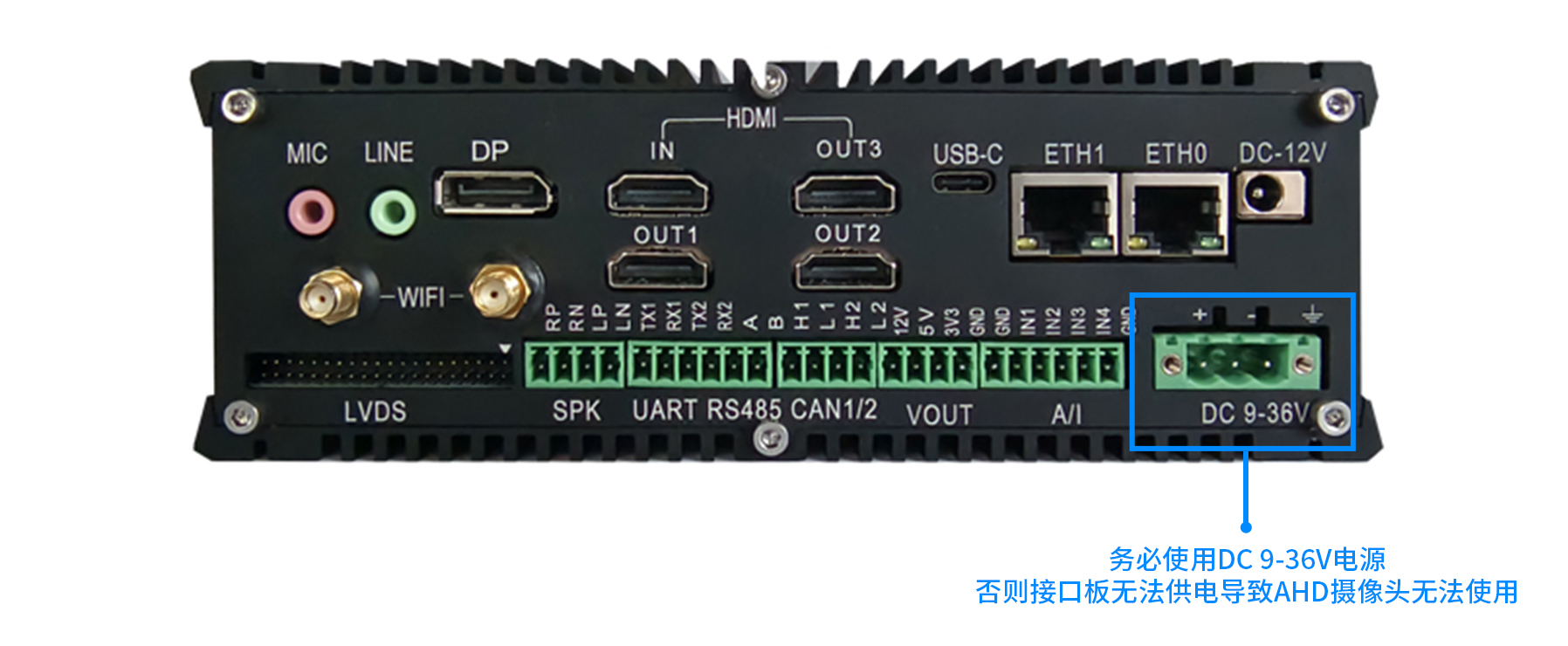
## 电源适配器[](#id1 "Permalink to this heading")
|
||
|
||
|
||
|
||
## AHD摄像头连接图片[](#id2 "Permalink to this heading")
|
||
|
||
|
||
|
||
## 更新固件[](#id3 "Permalink to this heading")
|
||
|
||
`20230314`版本之前默认不带AHD\*8功能,通过`uname -a`查询版本;
|
||
|
||
若不符合,烧录 [最新标准固件](http://neardi.com/cms/index/productsd.html?id=9&title=LPA3588) 烧录方法参阅 [《使用Type-C线升级固件》](http://wiki.neardi.com/wiki/LPA3588/zh_CN/docs/upgrade.html)一章。
|
||
|
||
## AHD摄像头对应设备节点[](#id4 "Permalink to this heading")
|
||
|
||
<table><thead><tr><th>AHD</th><th>设备节点</th></tr></thead><tbody><tr><td>AHD1</td><td>/dev/video11</td></tr><tr><td>AHD2</td><td>/dev/video12</td></tr><tr><td>AHD3</td><td>/dev/video13</td></tr><tr><td>AHD4</td><td>/dev/video14</td></tr><tr><td>AHD5</td><td>/dev/video3</td></tr><tr><td>AHD6</td><td>/dev/video2</td></tr><tr><td>AHD7</td><td>/dev/video1</td></tr><tr><td>AHD8</td><td>/dev/video0</td></tr></tbody></table>
|
||
|
||
## 修改测试脚本[](#id5 "Permalink to this heading")
|
||
|
||
修改`/rockchip-test/camera/camera_rkisp_test.sh` 打开`camera_rkisp_test.sh`,然后去掉里面的最后一行后加入:
|
||
|
||
```
|
||
DISPLAY=:0.0 gst-launch-1.0 v4l2src device=/dev/video0 ! video/x-raw,format=NV12,width=640,height=480, framerate=30/1 ! fpsdisplaysink&
|
||
gst-launch-1.0 v4l2src device=/dev/video1 ! video/x-raw,format=NV12,width=640,height=480, framerate=30/1 ! fpsdisplaysink &
|
||
gst-launch-1.0 v4l2src device=/dev/video2 ! video/x-raw,format=NV12,width=640,height=480, framerate=30/1 ! fpsdisplaysink &
|
||
gst-launch-1.0 v4l2src device=/dev/video3 ! video/x-raw,format=NV12,width=640,height=480, framerate=30/1 ! fpsdisplaysink &
|
||
gst-launch-1.0 v4l2src device=/dev/video11 ! video/x-raw,format=NV12,width=640,height=480, framerate=30/1 ! fpsdisplaysink &
|
||
gst-launch-1.0 v4l2src device=/dev/video12 ! video/x-raw,format=NV12,width=640,height=480, framerate=30/1 ! fpsdisplaysink &
|
||
gst-launch-1.0 v4l2src device=/dev/video13 ! video/x-raw,format=NV12,width=640,height=480, framerate=30/1 ! fpsdisplaysink &
|
||
gst-launch-1.0 v4l2src device=/dev/video14 ! video/x-raw,format=NV12,width=640,height=480, framerate=30/1 ! fpsdisplaysink
|
||
```
|
||
|
||
若单独测试一路AHD,务必加上sudo执行:
|
||
|
||
```
|
||
sudo gst-launch-1.0 v4l2src device=/dev/video11 ! video/x-raw,format=NV12,width=640,height=480, framerate=30/1 ! fpsdisplaysink
|
||
```
|
||
|
||
## 验证测试脚本[](#id6 "Permalink to this heading")
|
||
|
||
```
|
||
sudo /rockchip-test/camera/camera_rkisp_test.sh
|
||
```
|
||
|
||
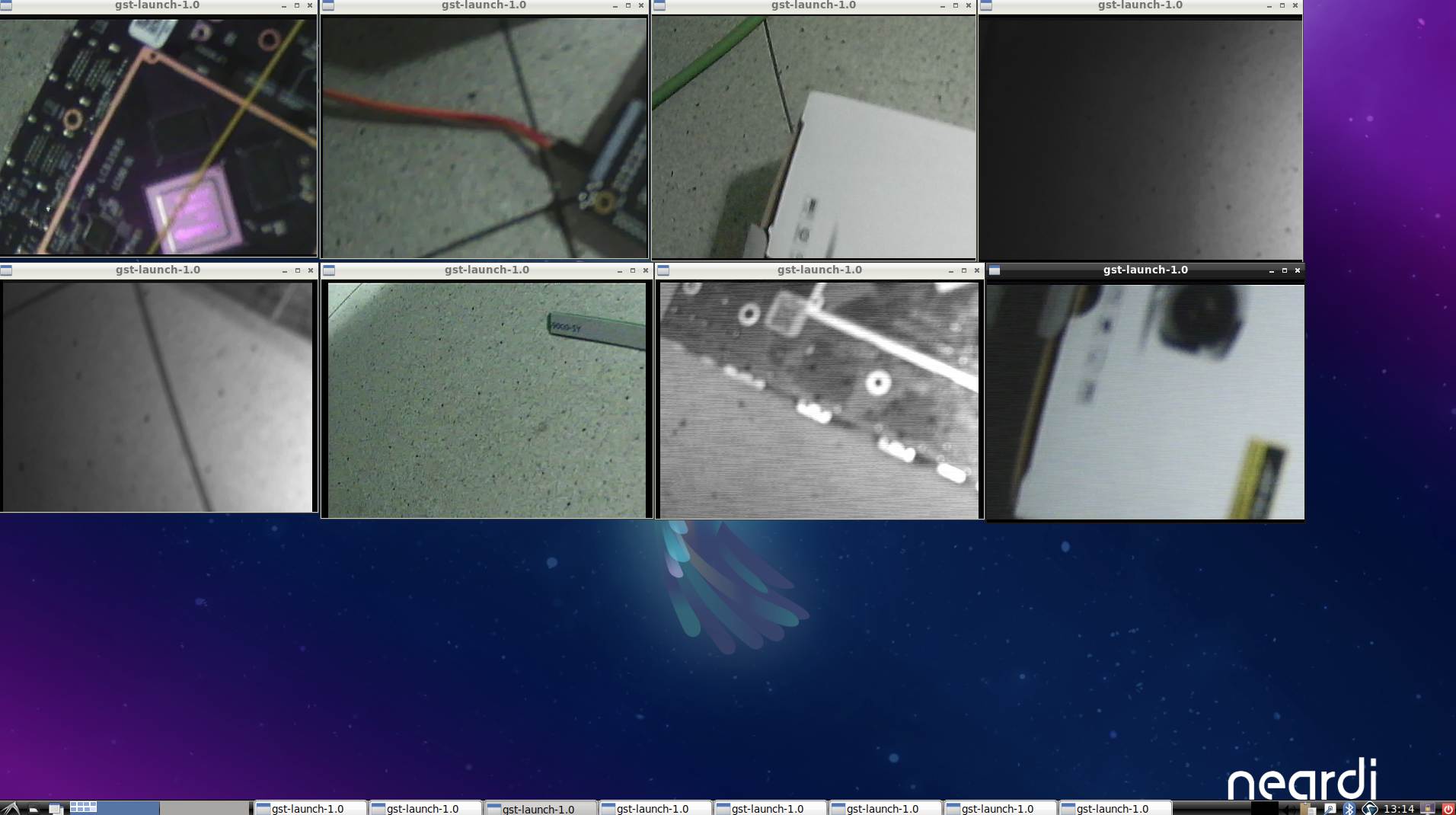
执行成功结果:
|
||
|
||
```
|
||
neardi@LPA3588:~$ sudo /rockchip-test/camera/camera_rkisp_test.sh
|
||
Start RKISP Camera Preview!
|
||
Setting pipeline to PAUSED ...
|
||
Pipeline is live and does not need PREROLL ...
|
||
Pipeline is PREROLLED ...
|
||
Setting pipeline to PLAYING ...
|
||
New clock: GstSystemClock
|
||
Setting pipeline to PAUSED ...
|
||
...
|
||
Redistribute latency...
|
||
0:22:57.3 / 99:99:99.
|
||
```
|
||
|
||
|
||
|
||
## FAQ[](#faq "Permalink to this heading")
|
||
|
||
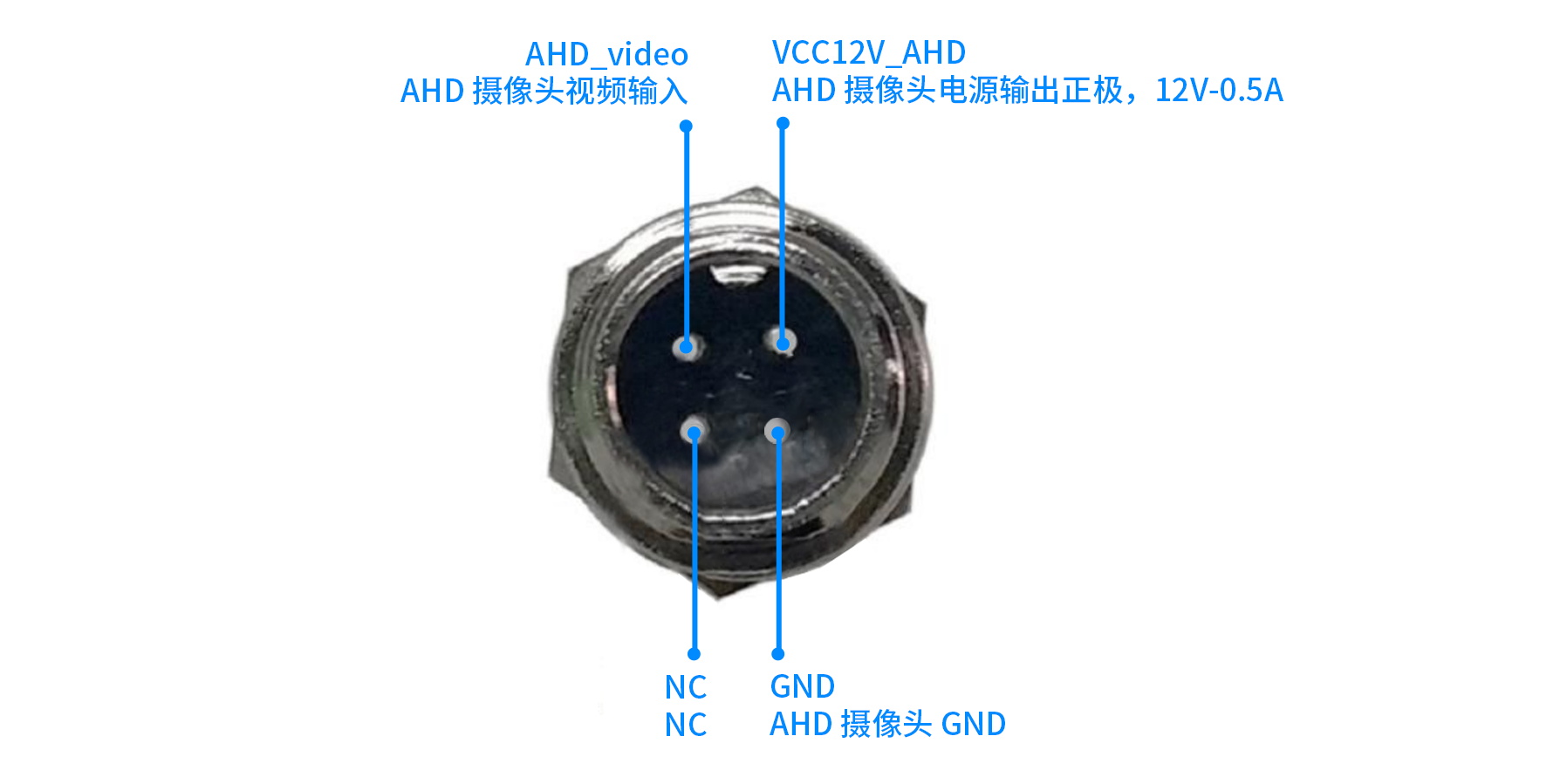
### AHD摄像头pin脚如何定义的?[](#ahdpin "Permalink to this heading")
|
||
|
||
|
||
|
||
### AHD摄像头为什么不出图?[](#id7 "Permalink to this heading")
|
||
|
||
#### 简单排查[](#id8 "Permalink to this heading")
|
||
|
||
* 摄像头确保是`720/1080p@25/30fps`分辨率。
|
||
|
||
* 8路摄像头使用同一分辨率和帧率;不要混用,例如AHD1接720p,AHD2接1080p。
|
||
|
||
* 不能热插拔。
|
||
|
||
* 若固件是自行编译的,确保SDK升级到最新的,`V4.0`及以上。
|
||
|
||
* 检查电源,使用`DC 9-36V`电源。
|
||
|
||
* 测试Neardi配套的摄像头,再对比自行购买的摄像头。
|
||
|
||
|
||
#### 抓图排查[](#id9 "Permalink to this heading")
|
||
|
||
使用v4l2-ctl工具抓图测试
|
||
|
||
```
|
||
# AHD1抓图
|
||
v4l2-ctl -d /dev/video11 --set-fmt-video=width=1920,height=1080,pixelformat=NV12 --stream-mmap=3 --stream-skip=3 --stream-to=/tmp/ahd.out --stream-count=1 --stream-poll
|
||
```
|
||
|
||
抓图正常返回结果,否则为异常:
|
||
|
||
```
|
||
<<<<
|
||
```
|
||
|
||
### 有没有C++的demo?[](#c-demo "Permalink to this heading")
|
||
|
||
参考 [neardi\_cam\_demo](https://gitee.com/neardi-dev/neardi_cam_demo)
|